
2018年3月29日 星期四


Windows10 安裝 Hyper-V
安裝 Hyper-V
Hyper-V 是 Windows 內建的選用功能,Hyper-V 並沒有可供單獨下載或安裝的元件。 有幾種方式可啟用內建的 Hyper-V 角色。


.03 Azure 服務 共用&分享 權限 給其他帳號
原因:之前客戶有需求需要管理到自己的Azure服務,可是我手上的Azure帳戶包含其他客戶的服務,我總不能都給他那位需要管理自己Azure服務的客戶吧~所以只能Google(餵狗)加上自己嘗試後最後革命成功。

切到訂用帳戶上
如何設定預設 Azure 訂用帳戶
- 在 Azure PowerShell 主控台或 Windows PowerShell ISE 中,輸入下列命令,將您的 Azure 帳戶新增到本機的 PowerShell 環境:Add-AzureAccount
Azure Application Insights Analytics 簡單分析語法
//所有瀏覽器所佔%數 圓餅圖
pageViews | summarize count() by client_Browser
| extend DurationBucket = tostring(client_Browser)
| project count_, DurationBucket
| render piechart
//pageViews 瀏覽器統計
pageViews
| summarize count() by bin(duration,20),client_Browser
| extend DurationBucket = tostring(duration)
| project client_Browser, count_
| render piechart
//pageViews 作業系統
pageViews
| summarize count() by bin(duration,20),client_OS
| extend DurationBucket = tostring(duration)
| project client_OS, count_
| render piechart
//pageViews國家
| summarize count() by bin(duration,20),client_CountryOrRegion
| extend DurationBucket = tostring(duration)
| project client_CountryOrRegion, count_
| render piechart
訂閱:
文章 (Atom)
解決'Microsoft.ACE.OLEDB.12.0' 提供者並未登錄於本機電腦上的問題
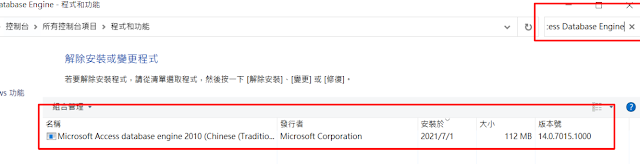
解決'Microsoft.ACE.OLEDB.12.0' 提供者並未登錄於本機電腦上的問題 環境 Server:Windows Server 2012 R2 Debug IDE: VS2019 Step1 確認是否有安裝Microsoft Access Dat...
-
 下載並安裝 Microsoft Web Platform Installer 5.0 https://www.microsoft.com/web/downloads/platform.aspx
 -
 解決'Microsoft.ACE.OLEDB.12.0' 提供者並未登錄於本機電腦上的問題 環境 Server:Windows Server 2012 R2 Debug IDE: VS2019 Step1 確認是否有安裝Microsoft Access Dat...